
| Terminal Response | Probable Cause | Action Taken |
|---|---|---|
| None of the Checks Traverse Completely |
The check is mangled, torn, or folded. | Follow the steps below to remove the jammed check. After the paper jam has been cleared resetting the unit may be required. To reset, unplug the power connector and plug it back in. |
| The check has a foreign substance on it. | Follow the steps below to remove the check and then perform a cleaning of the check track.After the paper jam has been cleared resetting the unit may be required. To reset, unplug the power connector and plug it back in. |

| Step # | Procedure |
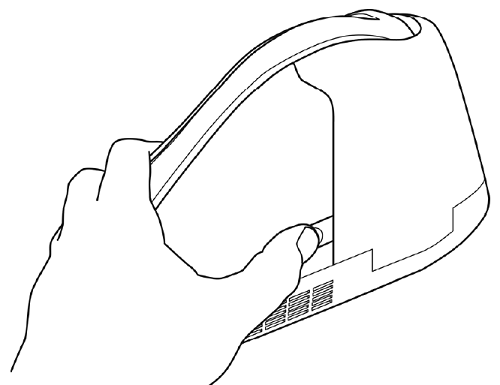
| 1) | To open the check path and gain access to the Scan Bars, grip the MDX as shown below. Press the access latch button with your thumb and the access door will pop open. |
 |
|
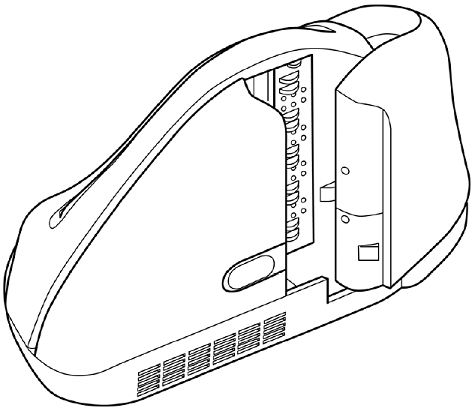
| 2) | When the check path access door is open, as shown below, check the path for debris. Remove any and all parts of the check that may have caused the jam. To clean, turn the unit over and tap gently on the bottom. |
 |
|
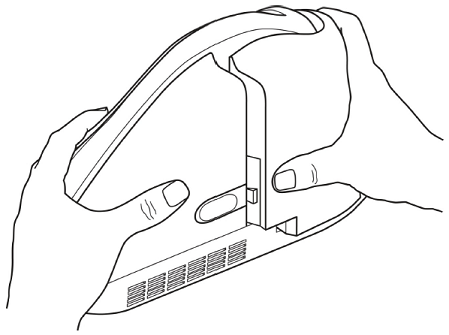
| 3) | Holding the unit as shown below, push the rear access door closed with the right hand while holding on the opposite side with the left hand. |
| 4) | The unit is properly closed when the two panels are flush and the latch has "clicked" into position. |
 |
|
Updated: 07/21/2017