| Terminal Displays
| Action Taken
|
| CREDIT . . . . . . . . . . . . . SALE |
ACCOUNT
 |
| |
| |
|
 |
|
Press the [Menu/Esc] button. 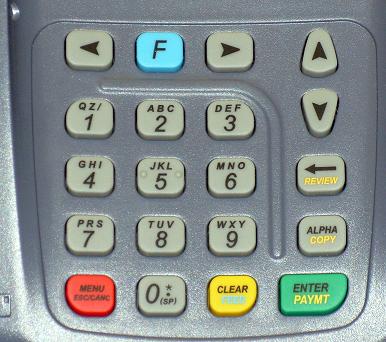 |
| ENTER PASSWORD: |
| |
| |
| |
|
|
|
Key in the current password and press the [Enter/Paymt] button. |
|
| MENU SCREEN: |
| 1. Reports |
| 2. Merch. Params |
| 3. Merch. Options |
|
|
|
Use the Down [ ]
button to scroll down to System Options. ]
button to scroll down to System Options. |
| MENU SCREEN: |
| 3. Merch. Options |
| 4. Hosts Params |
| 5. System Options |
|
|
|
Press the [Enter/Paymt] button. |
| SYSTEM OPTIONS: |
| 1. Date/Time |
| 2. Edit PIN Key |
| 3. Select Mager Key |
|
|
|
Use the Down []
button to scroll down to Set Batch Number. |
| SYSTEM OPTIONS: |
| 2. Edit PIN Key |
| 3. Select Mager Key |
| 4. Set Batch Number |
|
|
|
Press the [Enter/Paymt] button. |
| CHOOSE HOST: |
| 1. CARDSRUS CrDb |
| 3. SPKTCK Ch |
| 5. OPT Gn |
|
|
|
Press the [Enter/Paymt] button. |
| NEW BATCH NO: |
| 000000001 |
| |
| |
|
|
|
Start keying in the new batch number . . .
Continue keying in
the new batch number, it is not necessary to include the leading 0's, and press the [Enter/Paymt] button. |
| NEW BATCH NO: |
NEW BATCH NO:
 |
|
|
 |
|
| ARE YOU SURE? |
| ENTR=YES, MENU=NO |
| |
| |
|
|
|
Press the [Enter/Paymt] button. |
| SYSTEM OPTIONS: |
| 2. Edit PIN Key |
| 3. Select Mager Key |
| 4. Set Batch Number |
|
|
|
Press the [Menu/Esc] button twice. |
| MENU SCREEN: |
| 3. Merch. Options |
| 4. Hosts Params |
| 5. System Options |
|
|
|
| CREDIT . . . . . . . . . . . . . SALE |
| ACCOUNT
|
| |
| |
|
|
|
Change(s) complete. |
