| Terminal Displays
| Action Taken
|
| CREDIT . . . . . . . . . . . . . SALE |
ACCOUNT
 |
| |
| |
|
 |
|
Press the [Menu/Esc] button. 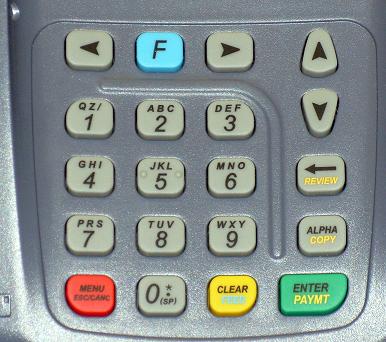 |
| ENTER PASSWORD: |
| |
| |
| |
|
|
|
Key in the current password and press the [Enter/Paymt] button. |
|
| MENU SCREEN: |
| 1. Reports |
| 2. Merch. Params |
| 3. Merch. Options |
|
|
|
Use the Down [ ]
button to scroll down to Host Params. ]
button to scroll down to Host Params. |
| MENU SCREEN: |
| 2. Merch. Params |
| 3. Merch. Options |
| 4. Hosts Params |
|
|
|
Press the [Enter/Paymt] button. |
| HOST PARAMS: |
| 1. Host Params |
| 2. Host Phone |
| 3. Prnt EDC Setup |
|
|
|
Press the [Enter/Paymt] button. |
| EDC PARAMETERS |
| 1. CARDSRUSCrDb |
| 2. SPKTCh |
| 3. OPT |
|
|
|
Use the Down []
button to scroll down to SPKTCh. |
| EDC PARAMETERS |
| 1. CARDSRUS CrDb |
| 2. SPKTCh |
| 3. OPT |
|
|
|
Press the [Enter/Paymt] button. |
| SPKTCh |
| 1. Merch_ID_Ver |
| 2. Merch_ID_Cnv |
| 3. Prt_Manual_MICR |
|
|
|
Use the Down []
button to scroll down to Default State. |
| SPKTCh |
| 2. Merch_ID_Cnv |
| 3. Prt_Manual_MICR |
| 4. Default_State |
|
|
|
Press the [Enter/Paymt] button. |
| SPKTCK Ch: |
| Default_State |
FL |
|
|
|
 |
|
Use the [Review/ ]
button to clear the current setting and key in the correct state and press the [Enter/Paymt] button. ]
button to clear the current setting and key in the correct state and press the [Enter/Paymt] button. |
To key in a letter, press the numbered button
with the desired letter on it and then press the [Alpha] button until you get the desired letter. 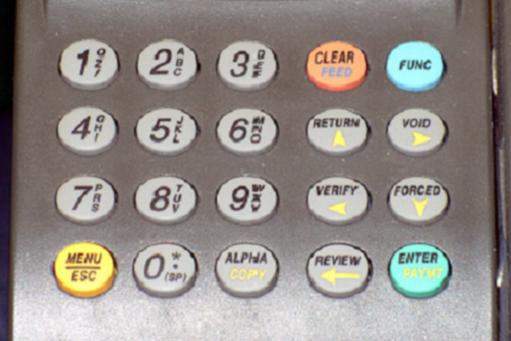
NOTE: The letters Q & Z are located on the number 1 button.
|
|
| SPKTCh |
| 2. Merch_ID_Cnv |
| 3. Prt_Manual_MICR |
| 4. Default_State |
|
|
|
Press the [Menu/Esc] button. |
| Save Changes |
| ENTER=YES, MENU=NO |
| |
| |
| |
|
Press the [Enter/Paymt] button. |
| EDC PARAMETERS |
| 1. CARDSRUS CrDb |
| 2. SPKTCh |
| 3. OPT |
|
|
|
Press the [Menu/Esc] button three (3) times. |
| HOST PARAMS: |
| 1. Host Params |
| 2. Host Phone |
| 3. Prnt EDC Setup |
|
|
|
| MENU SCREEN: |
| 2. Merch. Params |
| 3. Merch. Options |
| 4. Hosts Params |
|
|
|
| CREDIT . . . . . . . . . . . . . SALE |
| ACCOUNT
|
| |
| |
|
|
|
Change complete. |
