| Terminal Displays
| Action Taken
|
| CREDIT . . . . . . . . . . . . . SALE |
ACCOUNT
 |
| |
| |
|
 |
|
Press the [Menu/Esc] button. 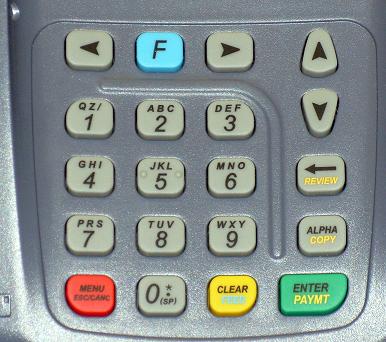 |
| ENTER PASSWORD: |
| |
| |
| |
|
|
|
Key in the current password and press the [Enter/Paymt] button. |
|
| MENU SCREEN: |
| 1. Reports |
| 2. Merch. Params |
| 3. Merch. Options |
|
|
|
Use the Down [ ]
button to scroll down to Communication. ]
button to scroll down to Communication. |
| MENU SCREEN: |
| 6. Radio Params |
| 7. Download |
| 8. Communications Params |
|
|
|
Press the [Enter/Paymt] button. |
| COMM MENU: |
| 1. Min. Retries |
| 2. DIAL : TONE |
| 3. Exchange Pref |
|
|
|
Use the Down []
button to scroll down to Exchange Pref. |
| COMM MENU: |
| 1. Min. Retries |
| 2. DIAL : TONE |
| 3. Exchange Pref |
|
|
|
Press the [Enter/Paymt] button. |
| EXCHANGE PREFIX |
| 1. NO |
| 2. YES |
| |
|
|
|
Use the Down []
button to scroll down to Yes. |
| EXCHANGE PREFIX |
| 1. NO |
| 2. YES |
| |
|
|
|
Press the [Enter/Paymt] button. |
| EXCHANGE PREFIX |
| Dialing Prefix |
 |
|
|
|
 |
|
Key in the required prefix and press the [Enter/Paymt] button. |
| COMM MENU: |
| 1. Min. Retries |
| 2. DIAL : TONE |
| 3. Exchange Pref |
|
|
|
Press the [Menu/Esc] button twice. |
| MENU SCREEN: |
| 6. Radio Params |
| 7. Download |
| 8. Communications Params |
|
|
|
| CREDIT . . . . . . . . . . . . . SALE |
| ACCOUNT
|
| |
| |
|
|
|
Change complete. |
