| Terminal Displays
| Action Taken
|
| CREDIT . . . . . . . . . . . . . SALE |
ACCOUNT
 |
| |
| |
|
 |
|
[ RDM ] or [ Magtek ]
Press the
[Menu/Esc] button. 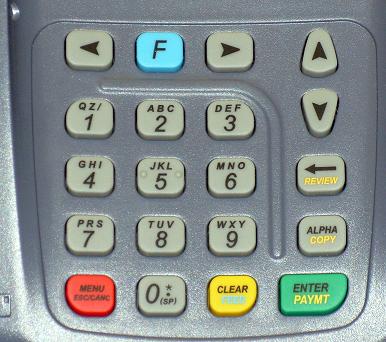 |
| ENTER PASSWORD: |
| |
| |
| |
|
|
|
Key in the current password and press the [Enter/Paymt] button. |
|
| MENU SCREEN: |
| 1. Reports |
| 2. Merch. Params |
| 3. Merch. Options |
|
|
|
Use the Down [ ]
button to scroll down to Merch. Options. ]
button to scroll down to Merch. Options. |
| MENU SCREEN: |
| 1. Reports |
| 2. Merch. Params |
| 3. Merch. Options |
|
|
|
Press the [Enter/Paymt] button. |
| MERCH. OPTIONS: |
| 1. Receipt Print |
| 2. No-Paper Mode |
| 3. Buzzer Set |
|
|
|
Use the Down []
button to scroll down to Peripherals. |
| MERCH. OPTIONS: |
| 9. Print Setup |
| 10. Store&Forward |
| 11. Peripherals |
|
|
|
Press the [Enter/Paymt] button. |
| PERIPHERALS: |
| 1. Ext. CardRdr |
| 2. Barcode Reader |
| 3. ChkReader Type |
|
|
|
Use the Down []
button to scroll down to Check Reader. |
| PERIPHERALS: |
| 1. Ext. CardRdr |
| 2. Barcode Reader |
| 3. ChkReader Type |
|
|
|
Press the [Enter/Paymt] button. |
| CHKRDR OPTIONS: |
| 1. ChkReader Type |
| |
| |
|
|
|
Press the [Enter/Paymt] button. |
| CHKRDR OPTIONS:
|
Standby . . . |
| CHKRDR OPTIONS:
|
CHKRDR OPTIONS:
RDM NEEDS TO BE
TURNED OFF AND
ON |
|
Unplug the power to the RDM and plug it back in. |
| CHKRDR OPTIONS: |
| 1. ChkReader Type |
| 2. Send Images |
| 3. Clear Images |
|
|
|
Press the [Menu/Esc] button four (4) times. |
| PERIPHERALS: |
| 1. Ext. CardRdr |
| 2. Barcode Reader |
| 3. ChkReader Type |
|
|
|
| MERCH. OPTIONS: |
| 9. Print Setup |
| 10. Store&Forward |
| 11. Peripherals |
|
|
|
| MENU SCREEN: |
| 1. Reports |
| 2. Merch. Params |
| 3. Merch. Options |
|
|
|
| CREDIT . . . . . . . . . . . . . SALE |
| ACCOUNT
|
| |
| |
|
|
|
Reset of the RDM Imager is complete. |
