| Terminal Displays
| Action Taken
|
| CREDIT . . . . . . . . . . . . . SALE |
ACCOUNT
 |
| |
| |
|
 |
|
Press the [Menu/Esc] button. 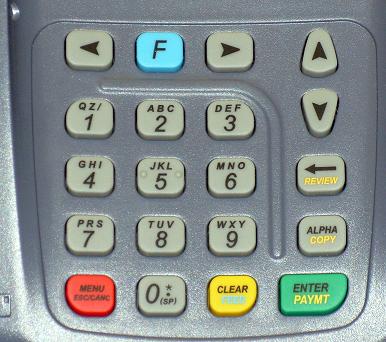 |
| ENTER PASSWORD: |
| |
| |
| |
|
|
|
Key in the current password and press the [Enter/Paymt] button. |
|
| MENU SCREEN: |
| 1. Reports |
| 2. Merch. Params |
| 3. Merch. Options |
|
|
|
Use the Down [ ]
button to scroll down to Merch. Params. ]
button to scroll down to Merch. Params. |
| MENU SCREEN: |
| 1. Reports |
| 2. Merch. Params |
| 3. Merch. Options |
|
|
|
Press the [Enter/Paymt] button. |
| MERCH.PARAMS: |
| 1. Authorization |
| 2. Security Level |
| 3. Edit Header |
|
|
|
Use the Down []
button to scroll down to Security Level. |
| MERCH.PARAMS: |
| 1. Authorization |
| 2. Security Level |
| 3. Edit Header |
|
|
|
Press the [Enter/Paymt] button. |
| SECURITY SWITCH: |
| 1. User Password |
| 2. Batch |
| 4. Secure Card |
|
|
|
Use the Down []
button to scroll down to Secure Card. |
| SECURITY SWITCH: |
| 1. User Password |
| 2. Batch |
| 4. Secure Card |
|
|
|
Press the [Enter/Paymt] button. |
| CHOOSE EDC TYPE: |
| 1. All |
| 2. Credit |
| 3. Debit |
|
|
|
Press the [Enter/Paymt] button. |
| PRINT ACCOUNT: |
| 1. Always Full |
| 2. Last 4 Digits |
| 3. Always Short |
|
|
|
Use the Down []
button to scroll down to Always Short. |
| PRINT ACCOUNT: |
| 1. Always Full |
| 2. Last 4 Digits |
| 3. Always Short |
|
|
|
Press the [Enter/Paymt] button. |
| SECURITY SWITCH: |
| 1. User Password |
| 2. Batch |
| 4. Secure Card |
|
|
|
Press the [Menu/Esc] button three times. |
| SECURITY SWITCH: |
| 1. Authorization |
| 2. Security Level |
| 3. Edit Header |
|
|
|
| MENU SCREEN: |
| 1. Reports |
| 2. Merch. Params |
| 3. Merch. Options |
|
|
|
| CREDIT . . . . . . . . . . . . . SALE |
| ACCOUNT
|
| |
| |
|
|
|
Change(s) complete. |
