| Terminal Displays
| Action Taken
|
| CREDIT . . . . . . . . . . . . . SALE |
ACCOUNT
 |
| |
| |
|
 |
|
Press the [Menu/Esc] button. 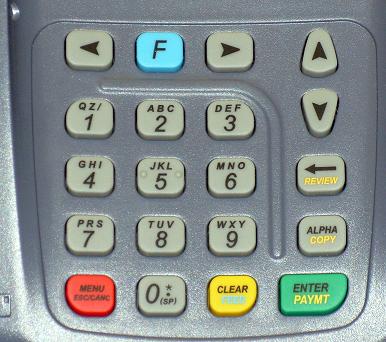 |
| ENTER PASSWORD: |
| |
| |
| |
|
|
|
Key in the current password and press the [Enter/Paymt] button. |
|
| MENU SCREEN: |
| 1. Reports |
| 2. Merch. Params |
| 3. Merch. Options |
|
|
|
Use the Down [ ]
button to scroll down to NOS Menu. ]
button to scroll down to NOS Menu. |
| MENU SCREEN: |
| 7. Download |
| 8. Communications |
| 9. NOS Menu |
|
|
|
Press the [Enter/Paymt] button. |
| MENU SCREEN: |
| 8320 NOS: |
| 1. Back To Appl > |
|
|
|
 |
|
Use the Down [] button
to scroll down to NOS Info. |
| MENU SCREEN: |
|
|
|
|
Press the [Enter/Paymt] button. |
| MENU SCREEN: |
| NOS V 07.30.22.C |
| 11/25/04 (FLASH) |
|
|
|
|
|
Press the [Menu/Esc] button. |
| MENU SCREEN: |
|
|
|
|
Use the Up [ ] button
to scroll up to Back To Appl. ] button
to scroll up to Back To Appl. |
| MENU SCREEN: |
| 8320 NOS: |
| 1. Back To Appl > |
|
|
|
|
|
Press the [Enter/Paymt] button. |
| MENU SCREEN: |
| 7. Download |
| 8. Communications |
| 9. NOS Menu |
|
|
|
Press the [Menu/Esc] button. |
| CREDIT . . . . . . . . . . . . . SALE |
| ACCOUNT
|
| |
| |
|
|
|
Change(s) complete. |
