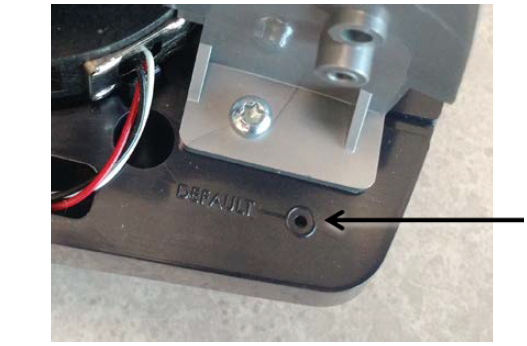
| The EC9600i series network scanners have a reset button in the back-right
corner of the scanner. The reset button restores the dashboard settings to their factory default. The reset
button does not affect the firmware installed on the scanner. |
|
 |
|
| To restore the scanner's default settings: |
| 1. |
Unplug the scanner. |
| 2. |
Use a pin to hold down the reset button and plug in the scanner. The scanner starts with
the factory default dashboard settings. |
|
| After you restore the scanner’s default settings: |
| • |
If you made changes to the dashboard settings to allow the scanner to work on your
network, you will need to make these changes again. |
| • |
The password used to access the Configuration, Administration, and Test Scanner pages
is reset to its default (rdm123). |
