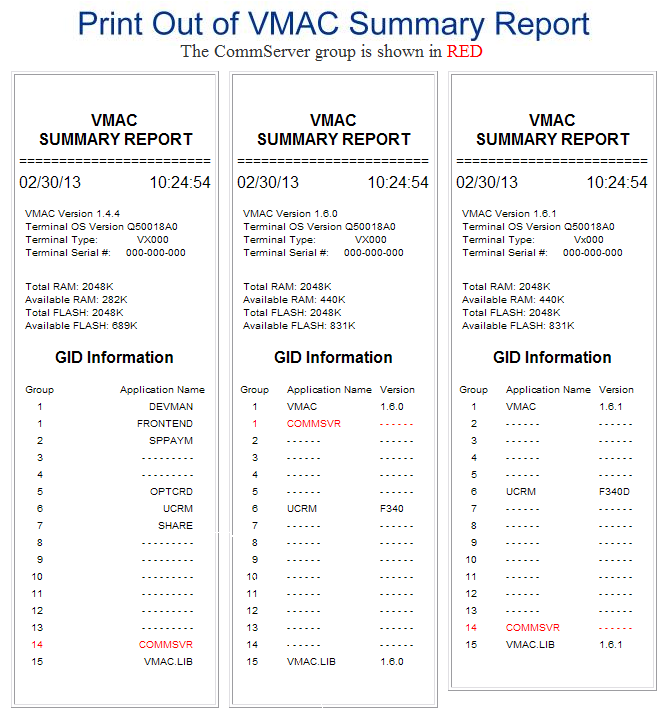
| Terminal Displays
| Action Taken
|
COMMSERVER
CHECKS
GIFT/LOYALTY
 |
 |
|
Simultaneously press the [F2] & [F4] buttons. |
| SYSTEM MODE ENTRY
PASSWORD |
| |
| __ __ __ __ __ __ |
| |
| |
|
 |
|
Key in 1, Alpha, Alpha, 66831. |
| SYSTEM MODE ENTRY
PASSWORD |
| |
| * * * * * * __ __ __ |
| |
| |
|
|
|
Press the Green [Enter] button. |
| SYS MODE MENU 1 |
| EDIT PARAMETERS |
| DOWNLOAD |
| RESTART |
| |
|
|
|
Press the [F2] button. |
| GROUP SELECT |
| |
| Group ID: _1 |
| |
| |
| |
|
|
|
Key in 14. |
| GROUP SELECT |
| |
| Group ID: 14 |
| |
| |
| |
|
|
|
Press the Green [Enter] button. |
| GROUP SELECT |
| |
| Group 14 Password |
| __ __ __ __ __ __ |
| |
| |
|
|
|
Key in 1, Alpha, Alpha, 66831. |
| GROUP SELECT
G 1 |
| |
| Group 14 Password |
| * * * * * * __ __ __ |
| |
| |
|
|
|
Press the Green [Enter] button. |
| SYS MODE EDIT
G14 |
| |
| File: config.sys __ |
| __ __ __ __ __ |
| |
| |
|
|
|
Press the Green [Enter] button. |
| GID 14: |
| PARAMETER: |
NEW |
 GO GO |
FIND |
| VALUE: |
EDIT |
| F:IMM.OUT |
EXIT |
| ▲ ▼
◄ ► |
|
 |
|
Press the [F1] button. |
| GID 14: |
| PARAMETER: |
NEW |
| ________________ |
FIND |
| ________________ |
EDIT |
| |
EXIT |
| ▲ ▼
◄ ► |
|
|
|
Key in VSOCSP. |
| GID 14: |
| PARAMETER: |
NEW |
| VSOCSP________ |
FIND |
| ________________ |
EDIT |
| |
EXIT |
| ▲ ▼
◄ ► |
|
|
|
Press the Green [Enter] button. |
| GID 14: |
| VALUE: |
|
| ________________ |
|
| ________________ |
|
| |
|
| ◄
► |
|
|
|
Key in 0. |
| GID 14: |
| VALUE: |
|
| 0_______________ |
|
| ________________ |
|
| |
|
| ◄
► |
|
|
|
Press the Green [Enter] button. |
| GID 14: |
| PARAMETER: |
NEW |
| VSOCSP |
FIND |
| VALUE: |
EDIT |
| 0 |
EXIT |
| ▲ ▼
◄ ► |
|
|
|
Press the Red [X] button. |
| SYS MODE MENU 1 |
| EDIT PARAMETERS |
| DOWNLOAD |
| RESTART |
| |
|
|
|
Press the [F4] button. |
COMMSERVER
CHECKS
GIFT/LOYALTY
|
|
|
Change(s) complete. |