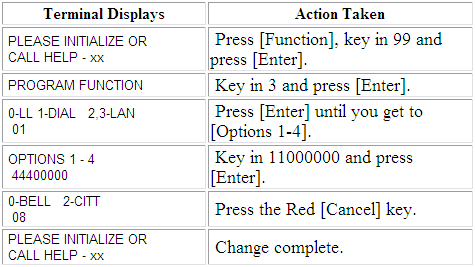
| Terminal Displays
| Action Taken
|
 |
Press the Blue [Function] button. |
|
|
Key in 99. |
|
|
Press the Green [Enter] button. |
| MERCHANT FUNCTION |
| MAINT PASSWORD |
|
| |
| |
|
Key in 028510. |
| MERCHANT FUNCTION |
| MAINT PASSWORD |
* * * * * * |
| |
| |
|
Press the Green [Enter] button. |
|
|
Key in 9. |
|
|
Press the Green [Enter] button. |
|
|
Key in 6. |
|
|
Press the Green [Enter] button. |
| TYPE ? |
| TRANSACTION COMPLETE |
| |
| |
|
Key in 2. |
|
|
Press the Green [Enter] button. |
| 00-ALL |
+ |
| 01-GETICHECK |
00 |
| 02-GETIGIFT |
00 |
| |
|
Key in 00. |
|
|
Press the Green [Enter] button. |
| TYPE ? |
| TRANSACTION COMPLETE |
| |
| |
|
Key in 1. |
|
|
Press the Green [Enter] button. |
| TYPE ? |
| TRANSACTION COMPLETE |
| |
| |
|
Press the Red [Cancel] button. |
|
|
Press the Blue [Function] button. |
|
|
Tricky part coming up.
Key in 3. |
|
|
Tricky part.
Press the Green [Enter] button. Immediately press and
hold down the Orange [Verify], [Void] and
[Offline] buttons. |
| ALTERNATE (EASIER) METHOD - Unplug the power. While holding down
the Orange [Verify], [Void] and [Offline] buttons, plug the power in. |
| ASPOS70.M9B DLL-00 |
| WAIT SELF-TEST |
| |
| |
|
After reboot and this display is showing, release the three buttons. |
| ENTER PASSWORD |
| FOR TID: 01234567 |
|
| |
| |
|
Key in 028510. |
| ENTER PASSWORD |
| FOR TID: 01234567 |
* * * * * * |
| |
| |
|
Press the Green [Enter] button. |
| PLEASE INITIALIZE |
| OR CALL HELP - FE |
| |
| |
|
Press the Blue [Function] button. |
|
|
Key in 98. |
|
|
Press the Green [Enter] button. |
|
|
Press the Green [Enter] button. |
| PLEASE INITIALIZE |
| OR CALL HELP - PE |
| |
| |
|
Press the Blue [Function] button. |
|
|
Key in 2. |
|
|
Press the Green [Enter] button. |
| TERMINAL ID NUMBER |
| 001234566 |
| |
| |
|
Key in the 9-digit TID. |
The first 8
digits of the number will be the our TID preceeded by a zero or two followed by a Check Digit - 
NOTE: If this parameter is not available, click on
image.  |
| TERMINAL ID NUMBER |
| 012345674 |
| |
| |
|
Press the Green [Enter] button. |
| INIT. TELEPHONE NO |
| 18776312757 |
| |
| |
|
Key in 18663120051. (No prefix at this time.) |
| INIT. TELEPHONE NO |
| 18663120051 |
| |
| |
|
Press the Green [Enter] button. |
| NMS TELEPHONE NO |
| 18776312757 |
| |
| |
|
Key in 18663120051. (No prefix at this time.) |
| INIT. TELEPHONE NO |
| 18663120051 |
| |
| |
|
Press the Green [Enter] button. |
|
|
Press the Green [Enter] button. |
|
|
If no prefix required, press the Green [Enter] button.
If prefix
required, key in the prefix and press the Green [Enter] button. |
|
|
No longer required. If prompted, press the Green [Enter] button. |
|
|
Press the Red [Cancel] button. |
| PLEASE INITIALIZE |
| OR CALL HELP - PE |
| |
| |
|
Press the Gray [Initialize] button. |
| PROGRAM LOAD |
| CORRECT? YES
OR NO |
| |
| |
|
Press the Green [Enter] button. |
| PROGRAM LOAD |
| MODEM TRAINING |
| |
| |
|
The terminal will dial out, configure the modem and start loading the
application(s). |
|
LOADING |
| WAITING FOR ANSWER |
| |
| |
|
This portion of the download takes approximately 25-30 minutes.
The display to the left shows that page 4 out of 12 is currently being downloaded.
Upon completion, the terminal will automatically reboot. |
|
|
PROGRAM LOAD
LOADING MEM
|
0012
|
| |
| |
|
|
LOADING |
| TRANSACTION COMPLETE |
| |
| |
|
|
|
Press the Gray [Initialize] button. |
|
INITIALIZE |
| WAITING FOR ANSWER |
| |
| |
|
This portion of the download takes approximately two minutes.
Upon completion, the terminal will automatically reboot. |
|
INITIALIZE |
| TRAINING MODEM |
| |
| |
|
|
INITIALIZE |
| PROCESSING NOW |
| |
| |
|
|
INITIALIZE |
| TRANSACTION COMPLETE |
| |
| |
|
|
|
Download Complete. |