| Terminal Displays
| Action Taken
|
Ingenico

 |
[iCT220]
Press the [F] button. |
| SYSTEM MANAGER | Enter Admin
Password |
|
Key in P123456 and press the Green [Enter] button.
Other possible passwords are 123456A, 123456P, 123456V, A123456, or
V123456. |
To key in a letter, press the numbered button with the desired letter on it and
then press the [F] button until you get the desired letter. 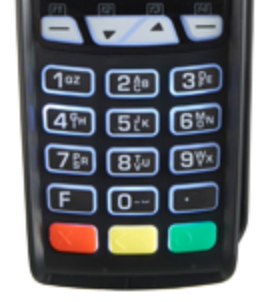 | |
| FUNCTIONS |
 |
0-TELIUM MANAGER |
 |
| |
1-TCU |
| |
2-CAV-DEV |
| |
3-TADU |
|
Press the [3] button. |
| TADU v10.02
|
| 0-CONFIGURE |
|
| 1-DOWNLOAD |
| 2-LOG |
| 3-DELETE SW |
|
Press the [0] button. |
| Download
Type |
| 0 - *Full |
|
| 1 - Partial |
| |
| |
|
Press the [0] button. |
| Communication
|
| 0 - *Dial |
 |
| 1 - Ethernet |
| 2 - Direct232 |
| 3 - PPP |
|
Press the [0] button. |
|
If the number shown is incorrect, press the Yellow [<] button to clear it.
Then key
in 18664630220, or 918664630220, and press the Green [Enter] button.
If the number shown is correct,
press the Green [Enter] button. |
| Dial
Speed |
| 0 - *Highest |
|
| 1 - 14400 |
| 2 - 2400 |
| 3 - 1200 |
|
Press the [0] button. |
|
If the screen does not show TELIUM, press the Yellow [<] button to clear it.
Then key in TELIUM and press the Green [Enter] button.
If the screen does show TELIUM, press
the Green [Enter] button. |
|
If the name shown is incorrect, press the Yellow [<] button to clear it.
Then key in BC09120301, and press the Green [Enter] button.
If the name shown is correct, press the
Green [Enter] button. |
|
If the TID shown is incorrect, press the Yellow [<] button to clear it.
Then key in the ICT2XX and press the Green [Enter] button.
If the number shown is correct, press
the Green [Enter] button. |
| TADU v10.02
|
| 0-CONFIGURE |
|
| 1-DOWNLOAD |
| 2-LOG |
| 3-DELETE SW |
|
A receipt will print showing the configuration for the Download. See Below
Press the [1] button. |
|
Standby . . . |
| DOWNLOAD
|
| 8203690105.DGN |
Total: |
| Progress:
32 |
| |
|
Ingenico
|
Two more portions of a Receipt will print showing the Download Done and the
installation of the Parameters. See Below
Download completed and the terminal can now process
Checks. |


