| Terminal Displays
| Action Taken
|
HOME MENU
TSYS
Home
|
 |
 |
From the Home Menu, press the Red [Cancel] button. 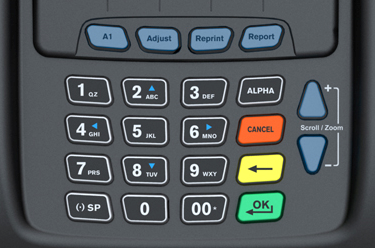 |
Application
Manager
V 0.20
Please enter
system
Password:****** |
|
|
Key in 000000 and press the Green [OK/↵] button. |
TechTrex
AppManagerDownload
Remove
Enter
App
Set Main App |
|
|
Press the [F1] button. |
Download
Individual Download
Package Download
|
|
|
Press the [F1] button to download TSYS or Gift Cards.
Press
the [F2] button to download Checks (Package). |
TechTrex
AppManagerAppl Download
Kernel
Download
App Mngr Download
Logo Download |
|
|
Press the [F1] button. |
TechTrex
AppManagerSD Card
RS-232 Passive
IP Download
PSTN Full |
|
|
Press the [F4] button. |
Download
Please enter the
Reference #:
0 0 0 0 0 0 0 2 1 4
0 8 |
|
|
Enter the Reference Number for the merchant and press the Green [OK/↵] button.
|
| Special Notes
→ |
CURRENT IDIVIDUAL REFERENCE
NUMBERS:
TSYS: 000000019630
Gift Card: 000000019193
CURRENT PACKAGE REFERENCE
NUMBERS:
Checks: 000000021408 |
| The packages will contain the latest
versions of the Kernal, Application Manger, Scanner Firmware, and the GETI Check application.
|
|
Download
Dial Phone #:
19058569947
Want
to Change?YES NO |
|
|
If the number is correct, press the [Reprint] button below "NO" and download will
begin.
If the number is not correct, press the [Adjust] buttom below "YES" and follow the next
step. |
Download
Please enter new
dial phone #:
_
_ _ _ _ _ _ _ _ _ _ _ _
For ",", press "*" |
|
|
Key in either number below:
• 19056738334
and press the Green [OK/↵] button.
• 19056738857 and press
the Green [OK/↵] button.
NOTE: Press the Asterisk (*) button to enter a Comma (,).
|
Download
Dial Baud Rate:14400
Connecting ...
Please press CANC
to select baud rate |
|
|
Standby, unless you are planning to change the baud rate.
To change
the baud rate, press the Red [Cancel] button and proceed to the next screen. |
Download Cancelled
Baud rate:7200
Try other baud rate?
YES
NO |
|
|
Standby, unless you are planning to change the baud rate.
To change
the baud rate, press the Red [Cancel] button and proceed to the next screen. |
Download
Downloading
57% Completed
|
|
|
The terminal is currently downloading. |
Download
Download
Succeed
|
|
|
The download is done and now it will install the application. |
HOME MENU
TSYS
GETI
GETIGift
Home
|
|
|
The download is complete. |
